Contents
On the night of October 21, 2026, websites across Japan took themselves offline one after another. It was a precaution against two critical flaws found in the PHP runtime itself, nicknamed “PHP2Shell”. This post is based on results from an isolated test lab we ran on October 22, 2026. It covers how to check whether your site is affected, what the stopgap mitigations do and don’t cover, and what traces to look for in your logs after you update. It does not describe how to carry out an attack.
Official advisories list what you should check. This post shows what those checks actually look like on screen and in the logs, using results from our own lab. For the full picture of the incident and how each company responded, the piyolog summary (Japanese) is thorough, so read it alongside this one.
The key points:
- There are two flaws in the PHP runtime. Both can let an unauthenticated attacker run code with the privileges of the process that runs PHP. The vendor rates both 9.2 on CVSS v4.0
- Updating WordPress or other applications won’t fix this. You need to update the PHP runtime underneath
- The fixed versions are PHP 8.5.12, 8.4.27, 8.3.36, and 8.2.35. PHP 8.1 and older get no update from the PHP project
- If you can’t update right away, there are stopgap settings such as
session.upload_progress.enabled=0. They are not complete; only updating fixes the problem - Details leaked the day before the fix was released. After you update, check your logs for signs of an attack before the update
We also walk through the testing on YouTube (Japanese).
What to do now
This section is for people who run sites or servers. If you’re short on time, these four steps are enough to get moving. Each links to the section with details.
- Check which PHP version your site runs
- If it’s older than a fixed version, update (on 8.1 or older, plan a move to 8.2 or later)
- If you can’t update right away, apply the stopgap settings
- After updating, check your logs for the three traces
Ordinary users of websites don’t need to do anything. The maintenance windows you saw on services you use were part of this response.
Check whether your site is affected
This section is for people who run sites or servers. First, find out which PHP version is running.
Affected versions
Versions before the ones below are affected. Updating to the fixed version resolves the issue.
| Branch | Affected (before) | Fixed version | Status |
|---|---|---|---|
| 8.5 | 8.5.12 | 8.5.12 | Supported |
| 8.4 | 8.4.27 | 8.4.27 | Supported |
| 8.3 | 8.3.36 | 8.3.36 | Supported |
| 8.2 | 8.2.35 | 8.2.35 | Supported |
| 8.1 and older | — | None from PHP | End of life |
PHP 8.1 and older get no update from the PHP project. The developers published only minimal source-level mitigations for 7.4, 8.0, and 8.1. The real fix is to move to a supported version (8.2 or later).
On shared hosting
Many hosting companies have applied the fix for their customers. Check your host’s announcements first. You can see your site’s PHP version here:
- WordPress: in the admin screen, go to . WordPress.org’s Japanese site also states that WordPress itself does not need an update for this issue
- Your hosting control panel
On a VPS or cloud server you manage
Check the version from the command line:
php -vOne caution: the command-line PHP and the PHP that serves your website can be different. Where you check depends on whether the web side uses mod_php (built into Apache) or PHP-FPM. To tell them apart, run this with the PHP that serves your site:
php -r "echo PHP_SAPI, PHP_EOL;"apache2handler means mod_php, and fpm-fcgi means PHP-FPM. mod_php carries the highest risk: with default settings, an attack has been shown to work before any application code runs (GHSA-w8hw-w9fx-j79w).
If you use PHP packages from your operating system (such as Ubuntu or RHEL), your version number may differ from the ones above and still be fixed, because distributions backport fixes into older version numbers. In that case, look up the CVE numbers in your OS’s security tracker.
| Distribution | Where to check | Example |
|---|---|---|
| Debian | The CVE page on security-tracker.debian.org | Fixed in bookworm 8.2.35-1 |
| Ubuntu | ubuntu.com/security/CVE-2026-109618 and related pages | Fixed in noble 8.3.6-0ubuntu0.24.04.13 and jammy 8.1.2-1ubuntu2.28 |
| Red Hat | access.redhat.com/security/cve/CVE-2026-109618 and related pages | Fixes released for RHEL 8, 9, and 10 |
When PHP is built into a product
Some appliances and packaged products run PHP inside them. In that case, check the product vendor’s announcements.
Lab results: what happens before the first line of your app runs
This section is for people who want to see the mechanism for themselves. Our lab is a virtual machine with no connection to the outside. It runs unpatched PHP 8.4.26. On screen, the left side shows the server’s logs and the right side shows the test client. We don’t show attack steps or the data we sent, only the server-side logs and the results.
Session state is created when the request is received
We sent a request to a plain page that never calls the session functions. Even so, session state was created when PHP received the request, before a single line of the application’s code ran.
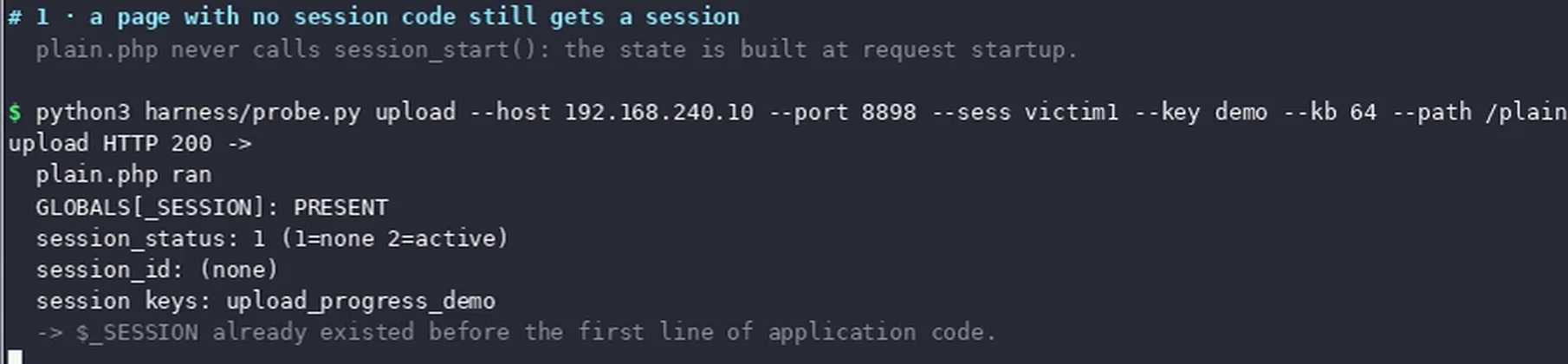
$_SESSION exists before the app's code runs. No amount of reviewing your app's code would prevent this; it happens in the layer below.A worker crashes when memory runs out
Next, we made the request exhaust the memory limit while PHP was parsing it. Right after a fatal error, the worker handling the request crashed.

child 23 exited with code 70 right after Allowed memory size ... exhausted. This abnormal worker exit is the third of the "three traces" described later.What the lab shows
The lab clears up two common misconceptions:
- “Updating WordPress is enough”: the problem happens before the first line of the app runs, while the PHP runtime is receiving the request. Updating the app leaves the hole open if PHP underneath is old
- “Old PHP versions aren’t affected”: PHP 8.1 and older get no fix, which makes them riskier, not safer

upload_progress=0 blocks one of the paths, and that the real fix is a fixed version such as PHP 8.4.27.If you can’t update yet
This section is for people who can’t update right away. Both advisories state that the mitigations are not complete and that updating is the only complete fix. Treat the mitigations as a way to buy time until you update.
Turn off session.upload_progress
In our lab, this setting blocked the path that uses sessions (item 4 in Figure 4). Set it in php.ini or in your PHP-FPM pool configuration:
session.upload_progress.enabled = 0This setting can be changed in php.ini, httpd.conf, .htaccess, or .user.ini. However, the advisory asks you to set it in the server configuration rather than relying on ini_set() or .user.ini. After changing it, restart PHP-FPM. You can check the current value with the command below. Check it with the PHP that serves your site, since the web and command-line values can differ.
php -i | grep session.upload_progress.enabledOther mitigations listed by PHP
The official advisories list several mitigations for each CVE. Here are the main ones. Each blocks only some of the paths.
| CVE | Mitigation | What it covers |
|---|---|---|
| CVE-2026-109618 | Set memory_limit=-1 in a way the app can’t override, and restart all workers |
Removes failures at PHP’s memory limit; lower-level allocation failures remain |
| CVE-2026-109618 | Lower post_max_size (around 8M if you don’t need uploads, 32M if you do) |
Limits large requests |
| CVE-2026-109618 | Limit the number of inputs, multipart parts, headers, and nesting depth in front of PHP | Filters requests before PHP receives them |
| CVE-2026-109619 | session.upload_progress.enabled=0 |
The session path only |
| CVE-2026-109619 | On PHP 8.5, fatal_error_backtraces=0 |
One confirmed path |
The October 23 notice: keep the setting after you update
On October 23, PHP announced a separate vulnerability involving session.upload_progress, CVE-2026-115560. It recommends keeping session.upload_progress.enabled=0 until the next regular bug-fix release (php.net notice). If you applied the setting on October 21, you can leave it as is. In other words, keep the setting for now even after you update. So far only the CVE number has been announced; the full advisory is due with the next release. PHP says the issue only occurs in an unusual combination: an app that switches the session serialization handler to php at runtime, with the upload progress feature still enabled.
Look for signs of an attack after updating
This section is for people who run sites or servers. Details had already leaked on October 20, the day before the fixed versions came out. Updating alone doesn’t tell you whether you were attacked in the meantime.
The three traces JPCERT/CC lists
JPCERT/CC’s alert (Japanese) asks you to check past logs for these three things:
| Trace | Which log to check | How it looked in our lab |
|---|---|---|
A PHPSESSID cookie that is unusually long or malformed |
Web server responses and access logs | — |
Suspicious multipart/form-data requests, with memory-limit errors or HTTP 500s around them |
Access logs and PHP error logs | — |
| Workers exiting abnormally or restarting often | PHP-FPM error log | exited with code 70 in Figure 3 |
The abnormal worker exit in Figure 3 is exactly the third trace. The trace that JPCERT/CC describes in words shows up in a real log as a single line, like child 23 exited with code 70. You can look for lines of the same shape in your own logs.
How to search your logs
-
If you can read your server logs, such as on a VPS: search the PHP-FPM error log for lines where a worker
exited. The exit code may differ between setups, so search forexitedrather than a specific number. The log’s location depends on your setupgrep "exited" /path/to/php-fpm-error.logAround the times of any lines you find, compare against the web server’s (nginx or Apache) access log. Look for suspicious
multipart/form-dataPOST requests and HTTP 500 errors -
On shared hosting: look in the access log for stretches where POST requests and HTTP 500 errors appear in a row
No traces doesn’t mean you’re safe
JPCERT/CC notes that there are several attack paths, that no single rule catches them all, and that some attacks leave no trace. Not finding these traces doesn’t prove you weren’t attacked.
If you suspect a compromise
If you suspect a compromise, for example because unexpected files appeared, don’t rush to delete or overwrite anything. Preserve the logs and the environment, then disconnect the server from the network and investigate. If you wipe the system in a hurry, you also destroy the evidence of how the attacker got in.
How it works: the two flaws
This section is for people who want the technical details. Both flaws can lead to code execution with the privileges of the process that runs PHP, without authentication.
CVE-2026-109618 (RCE via OOM corruption)
When PHP runs out of memory, it abandons the current operation and aborts the request. If that abort happens in the middle of an operation that doesn’t expect it, request memory can be left in an invalid state, and the cleanup code may then use it. PHP says several techniques can trigger the out-of-memory condition and reach this state reliably.
CVE-2026-109619 (RCE via stale global state)
PHP workers keep state such as error and session information between requests, and some of it points to request memory. If that state isn’t reset before the request’s memory is freed, code that runs before the next request is initialized can use the stale state (a use-after-free).
Which layer the problem is in
Impact by runtime
PHP says every PHP installation that serves web requests is affected. What has been confirmed differs by runtime.
| Runtime | Status |
|---|---|
| mod_php (built into Apache) | Highest risk. RCE before any code runs has been shown with default settings |
| PHP-FPM | For 109618, the advisory says a full attack has not been shown. The PHP Foundation, however, says it confirmed RCE through an application path, so the two sources disagree. For 109619, RCE has been verified through the session path |
| FrankenPHP | Likely affected by 109618 |
| LiteSpeed | Structured like FPM; not verified |
Severity ratings differ
Severity depends on who rates it. The CVSS 10.0 seen in some news reports is not an official rating.
| Rated by | CVE-2026-109618 | CVE-2026-109619 |
|---|---|---|
| Vendor (CVSS v4.0) | 9.2 | 9.2 |
| NVD (CVSS v3.1) | 9.8 | 8.1 |
| Red Hat | 8.1 | 8.1 |
Exploitation status
Sources disagree on whether exploitation has been seen. As of October 25, 2026, when this post was written, neither CVE is in CISA’s Known Exploited Vulnerabilities (KEV) catalog. We could not confirm any actual damage in Japan (unconfirmed).
| Claim | Who |
|---|---|
| Saw attack traffic even before disclosure | Cloudflare |
| Saw exploitation in its own honeypots | watchTowr |
| Several reports of exploitation from partner hosts (no firm evidence of compromise yet) | Patchstack |
| Has not seen exploitation | Huntress |
| Has not seen successful exploitation | CISA (US), NCSC-NL (Netherlands) |
Timeline
From discovery to disclosure
Times are Japan Standard Time (UTC+9). Where sources disagree on a time, we note it.
| Date and time | Event |
|---|---|
| Aug 11 | Calif reports the issue to PHP |
| Aug 24 | Wiz reports it (OpenAI sends an additional report on Sep 18) |
| Oct 21, 03:26 | watchTowr points out the leak on X |
| Oct 21, morning to evening | PHP announces the upcoming release (sources disagree on the time: 19:30 or 20:32 UTC on Oct 20) |
| Oct 21, 13:01 and 21:44 | Japan’s national cybersecurity office posts warnings on X |
| Oct 21, 21:55 | Prime Minister Takaichi posts a warning on X |
| Oct 21, 22:34 to 23:09 | GitHub advisories, CVE records, and the fixed versions are published |
| Oct 22 | JPCERT/CC and IPA issue alerts |
| Oct 23 | PHP announces CVE-2026-115560 and asks users to keep the setting |
In Japan
Japan’s national cybersecurity office and Prime Minister Takaichi posted on X, asking site operators to apply the fix and, if they couldn’t apply it right away, to consider taking their sites offline temporarily. According to piyolog’s count (as of October 24), 246 organizations in Japan took their sites offline as a precaution. Here is the breakdown by category. The full list of organizations is in the piyolog post (Japanese).
| Category | Count | Category | Count |
|---|---|---|---|
| National government | 3 | Video, streaming, e-books, publishing | 19 |
| Local governments | 18 | E-commerce, tickets, reservations | 27 |
| Financial institutions | 8 | Hosting and IT services | 29 |
| Transport and infrastructure | 11 | Entertainment and music | 33 |
| Universities, research, schools | 9 | Associations | 12 |
| Broadcasting and newspapers | 2 | Other companies | 45 |
| Games | 30 |
Summary
What you need to update is the PHP runtime underneath, not WordPress. And the work isn’t done once you update; it’s done once you’ve checked that nothing got in beforehand.
- Check: find your PHP version
- Update: if it’s older than a fixed version, update (on 8.1 or older, plan a move to 8.2 or later)
- Configure: set
session.upload_progress.enabled=0, and keep it for now after updating - Review: check your logs from October 20 onward for the three traces
Related videos (Japanese)
- Full video: Why did over 200 sites go offline in one night? (Dissected in a test lab)
- Short: The “PHP2Shell” that took sites across Japan offline, run in an isolated lab
Sources
- PHP 公式 News Archive 2026(10/21 のセキュリティリリース、10/23 の案内)www.php.net/archive/2026.php
- 公式アドバイザリ GHSA-w8hw-w9fx-j79w(CVE-2026-109618)github.com/php/php-src/security/advisories/GHSA-w8hw-w9fx-j79w
- 公式アドバイザリ GHSA-6wmf-4rv5-p3rp(CVE-2026-109619)github.com/php/php-src/security/advisories/GHSA-6wmf-4rv5-p3rp
- PHP Foundation「Today's PHP security release」thephp.foundation/blog/2026/10/21/todays-php-security-release-and-how-were-strengthening-php-security/
- JPCERT/CC 注意喚起 JPCERT-AT-2026-0033www.jpcert.or.jp/at/2026/at260033.html
- IPA 注意喚起(2026-10-22)www.ipa.go.jp/security/security-alert/2026/alert20261022.html
- WordPress.org 日本語「PHP の重大なセキュリティリリース」ja.wordpress.org/2026/10/21/critical-php-security-release/
- NVD CVE-2026-109618nvd.nist.gov/vuln/detail/CVE-2026-109618
- NVD CVE-2026-109619nvd.nist.gov/vuln/detail/CVE-2026-109619
- 英国 NCSC「Critical security issue affecting PHP」www.ncsc.gov.uk/news/critical-security-issue-affecting-php
- piyolog「PHPの2件の深刻な脆弱性についてまとめてみた」piyolog.hatenadiary.jp/entry/2026/10/21/174516
Checked on 2026-10-25